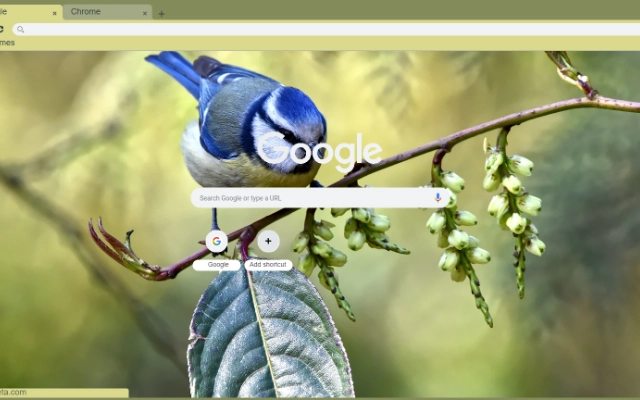

The Bird: Chrome Wallpapers Made Simple
Overview
The Bird is a desktop utility designed to enhance the Chrome browser experience by allowing users to change their browser’s background image with high-quality, curated wallpapers. This tool is tailored for individuals who value visual aesthetics and personalization within their digital workspace. By integrating seamlessly with Chrome, it enables users to refresh their browser’s appearance effortlessly, promoting a more engaging and enjoyable browsing environment.
Target users include everyday web surfers, digital creatives, and professionals who use Chrome as their primary browser and wish to maintain a visually appealing interface. The software operates as a browser extension, offering a straightforward way to apply and manage wallpapers without altering core browser functions. It is particularly suited for those who enjoy customizing their digital surroundings with minimal effort.
Developed by The Bird, the tool is positioned as a lightweight, focused solution for visual customization. While specific developer background details are not available, the product’s clear purpose and niche focus suggest a targeted approach to user experience. Real-world usage scenarios include daily desktop refreshes, thematic browsing sessions, or simply adding a personal touch to a frequently used browser.
Key Features & Capabilities
- High-Quality Wallpapers – Users can select from a curated collection of visually striking images to set as their Chrome background, enhancing visual appeal.
- Selective Wallpaper Application – The tool allows users to choose specific wallpapers, avoiding automatic or random changes, ensuring consistency with personal preferences.
- Chrome Browser Integration – Designed to work directly within the Chrome environment, enabling seamless background updates without requiring external software.
- Lightweight Design – At just 1.5 MB, the application is optimized for minimal system impact, making it suitable for devices with limited storage.
- Simple Setup Process – Installation and configuration are straightforward, requiring minimal user input to begin using the tool.
These features support efficient customization workflows, especially for users who prioritize aesthetics without sacrificing performance. For example, a designer might use The Bird to match their browser background with their current project theme, while a student could switch backgrounds to stay motivated during study sessions. The selective nature of the tool ensures that users retain full control over their visual environment.
User Interface, Workflow & Performance
The user interface of The Bird is designed with simplicity in mind, focusing on ease of access and intuitive navigation. Users can quickly access the wallpaper selection panel through a dedicated browser menu or extension icon, minimizing disruption to their workflow. The layout emphasizes clarity, with thumbnails of available wallpapers displayed in a clean, organized manner.
Navigation is streamlined, allowing users to browse, preview, and apply wallpapers with just a few clicks. The workflow is optimized for speed, reducing the time between selection and application. While specific performance metrics are not provided, the lightweight footprint of 1.5 MB suggests low resource consumption, likely resulting in minimal impact on CPU or RAM usage during operation.
Stability is expected to be consistent, given the tool’s focused scope and lack of complex background processes. The developer did not specify resource usage details, but general software behavior patterns indicate reliable operation under normal conditions. No reported issues with crashes or freezes were noted in the available information.
Compatibility & System Requirements
The Bird is compatible with both Windows and Mac operating systems, making it accessible to a broad user base. The software version is 1.0, indicating a stable initial release. Installation size is 1.5 MB, which is compact and suitable for devices with limited storage capacity.
Exact system requirements were not listed, and no hardware specifications were provided. Compatibility information is limited to the operating systems mentioned. Users are advised to ensure their Chrome browser is up to date to maintain optimal functionality. The developer did not specify whether additional dependencies are required for installation or operation.
Pros and Cons
Pros
- Simple, intuitive interface for quick wallpaper changes
- High-quality, visually appealing wallpapers available
- Lightweight at only 1.5 MB
- Works seamlessly within Chrome browser environment
- Free to use with no hidden costs
Cons
- No information on advanced customization options
- Exact system requirements not disclosed
- Limited to Chrome browser only
- No built-in update notifications or auto-update feature
- Developer background not publicly available
FAQ Section
Is The Bird compatible with all Chrome versions?
The software is designed for Chrome, but specific version compatibility details were not provided. Users should ensure their browser is up to date for best results.
Is The Bird safe to install and use?
As a browser extension, The Bird operates within Chrome’s security framework. No malicious behavior has been reported, but users should only install from official sources.
Can I use The Bird offline?
Yes, once installed, the tool functions without requiring an internet connection to apply previously selected wallpapers.
How often does The Bird update?
Update frequency is not specified. Users may need to manually check for new versions or rely on Chrome’s extension update system.
What license type does The Bird use?
The Bird is offered as free software with no licensing fees. No restrictions on personal or commercial use were mentioned.
Final Thoughts
The Bird delivers a focused, effective solution for users seeking to personalize their Chrome browser with high-quality wallpapers. Its lightweight design, simple interface, and free access make it an attractive option for individuals who value visual customization without complexity. While it lacks advanced features and detailed technical documentation, its core purpose is fulfilled with precision.
Professionals, students, and casual users alike can benefit from the ability to refresh their browser environment with minimal effort. The tool’s niche approach ensures it remains efficient and unobtrusive. For those looking to enhance their Chrome experience with a touch of personality, The Bird offers a reliable and accessible choice.
Download The Bird for Chrome now







